A backtest shows what a fixed set of trading rules would have done on real market history. This guide explains the method and its limits, then runs one on an Android phone and checks it with real costs in MetaTrader 5.
Traders will spend an evening watching someone explain a strategy and a few seconds deciding to trade it. The checking happens afterwards, with real money, one losing trade at a time. That order is backwards, and the excuse for it has gone: you can backtest a forex strategy on your phone, on real market history, before a single order reaches a broker.
The less comfortable point is that a backtest is also the easiest way to fool yourself with numbers. A strategy adjusted until its history looks good will usually disappoint on the next stretch of data, and the reason is statistical, not bad luck.
Below: what backtesting is, where it came from, why forex makes it harder and where it goes wrong. Then a walkthrough on an Android phone in Forex Strategy Studio, and a check with real trading costs in MetaTrader 5.
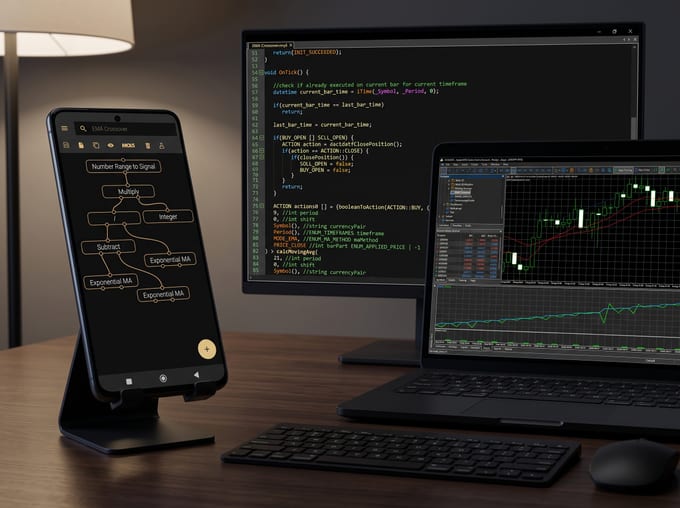
Every app screenshot in this article is from the shipping Android app. The backtest shown is an EMA(9)/EMA(21) crossover strategy on EURUSD H1, run on the phone on real market history. You can build the same strategy in the app and run it yourself.

What a backtest is
A backtest applies a fixed set of trading rules to past market data and records every trade those rules would have taken. The output is a trade list and statistics: what the strategy made or lost, how often it won and how deep its worst losing stretch was.
The important word is fixed. "Buy when the trend looks strong" cannot be backtested. "Buy at the open of the next bar after the 9-period exponential moving average closes above the 21-period one" can, because a computer or a disciplined person would take exactly the same trades every time.
Terms used in this article:
- Pip: the standard unit of price movement in a currency pair.
- Spread: the gap between the buying price (ask) and the selling price (bid). You pay it on every trade.
- Slippage: the difference between the price you expected and the price you got.
- Commission: a fee some brokers charge per trade, on top of the spread.
- Equity curve: the running result of the strategy, trade by trade.
- Drawdown: a fall from a peak in that curve to the next low. The maximum drawdown is the deepest one.
- In-sample and out-of-sample: the data used to build and adjust the strategy, and data kept aside until the end.
A backtest is a simulation, and regulators treat it as one. In the United States, trading advisers who show simulated results must warn that "these results do not represent actual trading" (17 CFR 4.41).
Where backtesting came from
The practice took its modern shape in three places: bank regulation, academic finance and retail trading software.
In January 1996 the Basel Committee on Banking Supervision published a framework for backtesting banks' market-risk models: compare the risk a model predicted with the trading results that followed (Basel Committee, 1996).
Academics asked the same question of trading rules. In 1992 William Brock, Josef Lakonishok and Blake LeBaron tested moving-average and trading-range-break rules on the Dow Jones index from 1897 to 1986 and found returns that standard price models could not explain (Brock, Lakonishok and LeBaron, 1992). In 1999 Ryan Sullivan, Allan Timmermann and Halbert White widened the search to 7,846 rules over 100 years of Dow Jones data. The best rules held up in-sample, but over 1987 to 1996 the authors found little evidence that they had any economic value (Sullivan, Timmermann and White, 1999). White then named the problem and built a test for it: data snooping, which happens when the same data is used both to choose a model and to judge it (White, Econometrica, 2000).
Retail traders got the tools in parallel. Omega Research, founded in Miami in 1982 by William and Ralph Cruz, demonstrated System Writer in December 1987, software meant to let a non-programmer describe a trading system and test it; TradeStation followed in 1991 (company history). Robert Pardo's 1992 book Design, Testing, and Optimization of Trading Systems became a reference work; its 2008 edition gives a chapter to walk-forward analysis, which adjusts on one window of history and tests on the next (Wiley). In retail forex, MetaQuotes released MetaTrader 5 in 2010 (MetaQuotes), and its Strategy Tester is where many forex strategies are tested today.
The latest step is the phone: testing no longer waits until you are at a desk.
Why forex backtesting is different
Forex trades on a vast scale: average daily turnover reached $9.6 trillion in April 2025 (BIS Triennial Survey, 2025). Liquid is not the same as easy to test. Five features of the market change what a backtest can tell you.
- It trades around the clock on weekdays. The Asian, European and US sessions behave differently. A test that covers only one of them can mislead.
- Leverage magnifies every result. When the European Securities and Markets Authority restricted retail CFDs in 2018, it capped leverage on major currency pairs at 30:1 and reported that 74 to 89% of retail accounts typically lose money (ESMA, 2018). A drawdown that looks tolerable in pips can be severe for a leveraged account.
- The spread is not fixed. It widens when liquidity thins: at the daily rollover, around major data releases and at the weekly open. MetaQuotes' own tester treats the spread as always floating, taken from history (MQL5 documentation).
- News can move the price past your stop. On 15 January 2015 the Swiss National Bank discontinued its minimum exchange rate of CHF 1.20 per euro with immediate effect (Swiss National Bank, via BIS). A simple backtest fills a stop-loss at the stop price. In a jump like that, a real order fills wherever the market next trades.
- Every broker is slightly different. Prices, spreads, commission and execution speed vary, so one strategy can produce different results on different accounts.
How to backtest a trading strategy, step by step
- Write the rules down. Entry, exit, stop-loss, take-profit, position size, market and timeframe. If two people could read them and take different trades, they are not finished.
- Choose the data. Market, timeframe and date range, covering different conditions: trending and ranging, quiet and volatile.
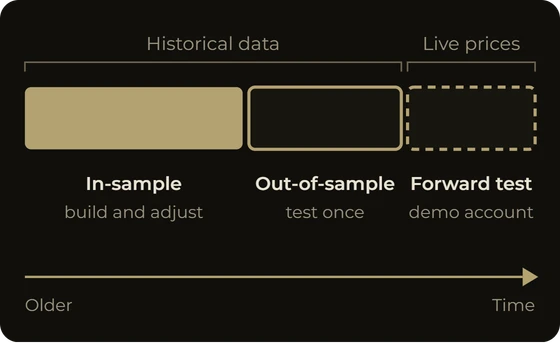
- Hold some data back. Before you look at any result, set aside the most recent part of the history. You will test on it once, at the end.
- Run the test, by hand or in software, logging every trade.
- Account for costs: spread, commission and an allowance for slippage.
- Read the results, then run the held-back period once.
- Forward-test on a demo account, in live conditions, before any real money.
The metrics that matter
- Net result: everything won minus everything lost. The least informative number on its own.
- Win rate: the share of winning trades. A high win rate with small wins and large losses can still lose overall.
- Profit factor: gross profit divided by gross loss, as MetaQuotes defines it in its tester reports, where one means the two are equal (MetaTrader 5 help).
- Average win and average loss: with the win rate, they show how the strategy makes its money.
- Expectancy: the average result per trade, (win rate × average win) minus (loss rate × average loss). As an illustrative example, a strategy winning 40% of trades, with an average win of 30 pips and an average loss of 15 pips, expects 3 pips per trade before costs: (0.4 × 30) minus (0.6 × 15).
- Maximum drawdown: the deepest fall from a peak. Would you really keep trading through it?
- Number of trades and trades per day: how much evidence the test holds, and how often the strategy pays the spread.
Build a strategy and backtest it on real market history, on your phone: get Forex Strategy Studio on Google Play.
Where backtesting goes wrong
A backtest is easy to run and easy to misread. These are the ways it fails.
Overfitting and data snooping
Give a strategy enough parameters and attempts, and it will fit the past. Each change that improves the history (for example: move the stop a little, skip Fridays, use a 13-period average instead of a 14-period one) also fits the noise in that stretch of data. The result looks excellent and predicts nothing.
This can be measured. David Bailey, Jonathan Borwein, Marcos López de Prado and Qiji Jim Zhu showed that impressive simulated performance is easy to reach after trying a modest number of configurations. Under their model's assumptions, with only five years of data no more than 45 independent configurations should be tried (Bailey et al., Notices of the AMS, 2014). When markets have memory, they found, an overfitted backtest tends to lose money out-of-sample, not merely break even (abstract).
The same trap works between strategies: test enough ideas on one history and some will look good by chance. If you tried dozens of variations and kept the best, its result mostly measures how hard you searched.
Look-ahead bias
The backtest uses information that was not available at the moment of the trade: entering at a bar's open on a signal known only at its close, using an indicator that recalculates its past values, or choosing the test period after seeing how the market moved. The fix is mechanical: compute signals on closed bars and trade on the next bar.
Survivorship bias
The major currency pairs do not disappear, but strategies do. You remember the systems that worked, the forum posts that circulate are the ones with good results, and abandoned ideas leave no record. The US regulator's required wording names the root: simulated programmes "are designed with the benefit of hindsight" (17 CFR 4.41).
Ignoring spread, slippage and commission
Costs are where many backtests quietly turn a losing strategy into a winning one, above all strategies that trade often for small moves. As an illustrative example, a strategy on M5 aiming for 5 pips per trade and paying a 1-pip spread gives up a fifth of every target before slippage or commission, and every losing trade grows by the same pip. Slippage tends to be worst exactly when such strategies are busiest: around news and at the open.
Forex Strategy Studio's backtester does not deduct spread, slippage or commission in the current version, so its results are before trading costs. Settings for all three are coming in the next major version of the app (v3). Until then, check any strategy with real costs in MetaTrader 5, as described below.
Execution modelling
A bar-based backtest knows four prices per bar: open, high, low and close. It does not know whether the high or the low came first, so if one bar touched both your stop and your target, it has to guess. Real execution adds latency, requotes and gaps. Even MetaQuotes warns that in MetaTrader 5's fastest testing mode, stops may trigger at a price different from the one specified (MQL5 documentation). Treat every backtest fill as an estimate.
Too few trades
A short run of winners can happen by chance to a strategy with no edge. There is no universal minimum, but the fewer the trades, the wider the range of results the same rules could have produced on slightly different data. Treat a short test as a reason to test more, not as evidence.
Testing only in-sample
If you adjust and evaluate on the same data, you have measured how well you adjusted. Keep an out-of-sample period untouched, test on it once and accept the answer. MetaTrader 5 builds this in: its Forward setting reserves the latest half, third or quarter of the period for a separate forward test (MetaTrader 5 help).
What even a good backtest cannot tell you
Markets change, and no length of history guarantees the future. A backtest also does not test you: it never hesitates, never skips a trade after a losing streak and never doubles up. The US regulator's required wording ends on the point that matters: "No representation is being made that any account will or is likely to achieve profits or losses similar to these being shown" (17 CFR 4.41).
Ways to backtest: by hand, in software, on a phone
- By hand on a chart. Hide the future, step forward bar by bar and log each trade. Bar-replay tools speed this up; our pages comparing Forex Strategy Studio with Forex Tester, FX Replay and TradingView show how Forex Strategy Studio compares.
- In a spreadsheet. Signals in columns, results summed. One misplaced cell reference can introduce look-ahead bias.
- In a platform's built-in tester. MetaTrader 5's Strategy Tester runs an Expert Advisor, a program that trades automatically, on your broker's history and costs.
- In dedicated backtesting software. Desktop and web tools built for testing strategies. We have comparisons for StrategyQuant, Build Alpha, Backtrex and Backticks, and the full list is on the comparison hub.
- On the phone. When you backtest on mobile, the questions about data and costs stay the same; only the place changes.
Forex Strategy Studio is the on-phone approach. The backtest runs on the phone, in the same app where you build the strategy visually and from which you export real MQL5 source code for any MetaTrader 5 broker. You can backtest EURUSD, GBPUSD, USDJPY, USDCHF, AUDUSD, USDCAD, NZDUSD and BITCOIN on M5, M15, H1, H4 and D1. Everything the app does is on the features page.
| Approach | What you need | How long it takes | What it suits |
|---|---|---|---|
| By hand on a chart | Charts with history, a trade log, discipline | Slow: each trade is stepped through by hand | Learning how an idea behaves bar by bar |
| Spreadsheet | Exported price data, spreadsheet skills | Slow to set up, quick to rerun | Simple rules you want to inspect cell by cell |
| Platform tester (MetaTrader 5) | A computer, MetaTrader 5, the strategy as an MQL5 Expert Advisor | Quick once the Expert Advisor exists | Testing with your broker's ticks, spreads and commission |
| Dedicated software | A computer or browser, time to learn the tool | Depends on the tool | Traders who test at a desk |
| On the phone (Forex Strategy Studio) | An Android phone, no code | Results when the run ends | Building and testing ideas anywhere, then exporting to MetaTrader 5 |
Backtest a forex strategy on your phone
Here is how to backtest a forex strategy on your phone in Forex Strategy Studio, using the strategy from the screenshots: a 9-period and 21-period exponential moving average crossover on EURUSD H1.
- Install the app. Forex Strategy Studio runs on Android 7.0 or later and is on Google Play. It is not available on iPhone.
- Let the market history download. While the phone is online, the app downloads history for the markets and timeframes you use. After that, backtests run without a connection.
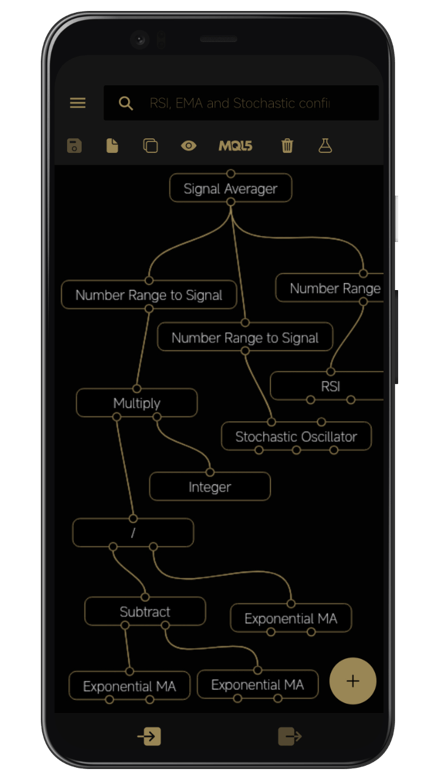
- Build the strategy in the Strategy Builder, the visual strategy designer: you connect blocks on a canvas instead of writing code. Indicator blocks include RSI, MACD, EMA, SMA and the Stochastic Oscillator, alongside candle data and logic and maths blocks. For the crossover, connect two EMA blocks to a signal that fires when one crosses the other.
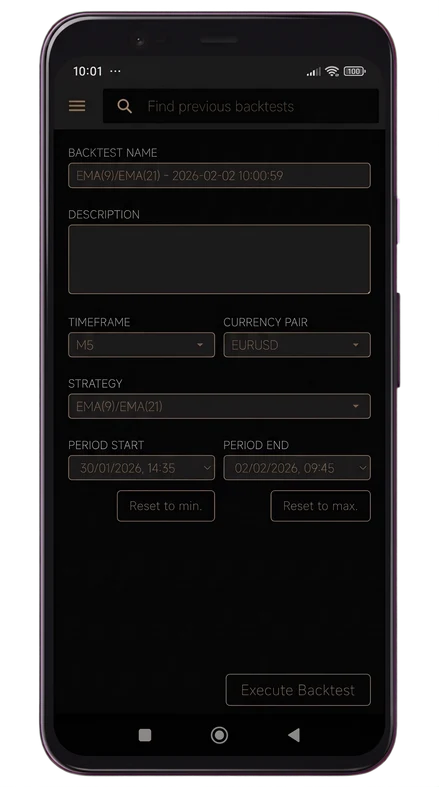
- Configure the backtest: the strategy, the market, the timeframe and the date range.
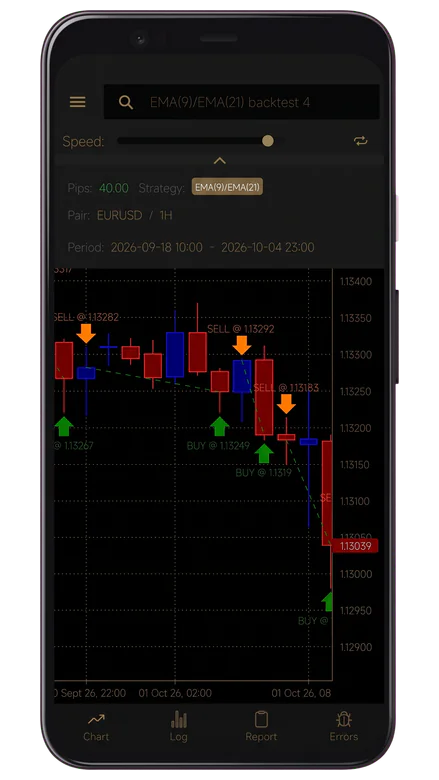
- Watch the replay on the Chart tab. The test plays back bar by bar, with buy and sell markers at every entry and exit and a Speed control. Odd entries show up here before they hide inside a statistic.
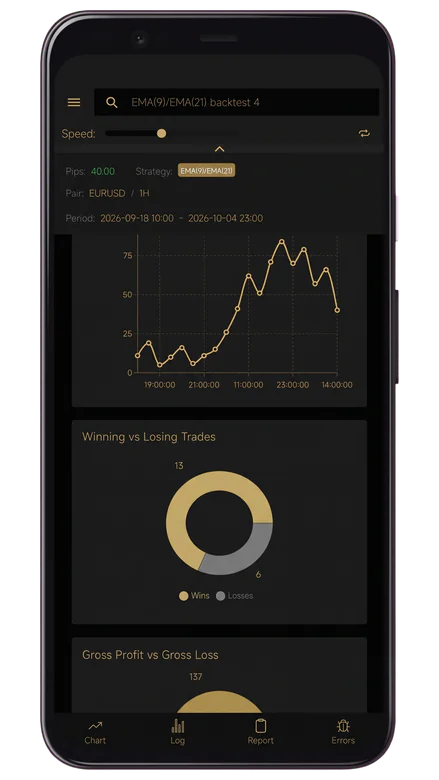
- Read the Report tab: equity curve, winning vs losing trades, gross profit vs gross loss, total net pips, profit factor, win rate, average win, average loss, expectancy, maximum drawdown in pips and trades per day. Read them together, and remember they are before trading costs.
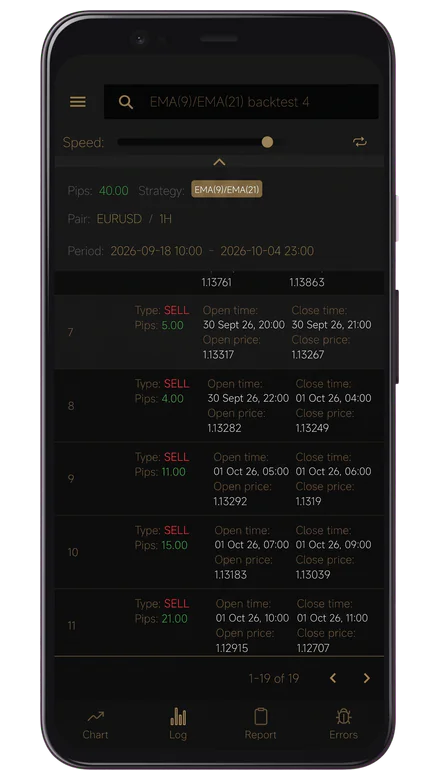
- Check the Log tab. Every trade with its entry, exit and result in pips. A strategy carried by two trades is not one that earns steadily.
- Verify signals the same way. Any signal configuration can go through the backtester before you rely on it.
- Export when you are satisfied. Tap MQL5 in the Strategy Builder toolbar, then Share, to produce a real
.mq5file. The app does not require a backtest to pass before export, so that judgement is yours. Every step is in our guide to exporting a strategy to MetaTrader 5.
Testing with real costs in the MT5 Strategy Tester
Because the app does not yet deduct trading costs, the next step for a serious strategy is a forex robot backtest in MetaTrader 5, under your broker's real conditions.
- Compile the Expert Advisor. In MetaEditor, open File, then Open Data Folder, copy the
.mq5file intoMQL5/Experts/Advisorsand compile it, as shown in the MT5 export guide. - Open it in the tester. In MetaTrader 5, right-click the Expert Advisor in the Navigator and choose Test (MetaTrader 5 help).
- Match the phone test: same symbol and period, and a date range covering it and, where available, more history.
- Use real ticks. Choose Every tick based on real ticks, which MetaQuotes describes as close to real conditions. The spread then comes from the recorded history and floats as it did (MQL5 documentation).
- Add a delay. Set Delays to a random delay, or a fixed one based on your ping to the broker's server, so the price can move between order and fill.
- Set commission. In the advanced testing settings, under Commission, choose Use predefined commissions to apply your account's commission, or enter your broker's rates.
- Keep an out-of-sample period. Set Forward to 1/3 or 1/4.
- Run and compare. Click Start and read the Result, Graph and Forward tabs. MetaTrader 5 reports in your deposit currency and the app in pips, so compare the profit factor and the shape of the results, not the totals.
- Forward-test on a demo account for a period you decide in advance, before any real money.
Coming in v3: spread, slippage and commission settings in the app's backtester, backtesting on gold (XAUUSD), and importing market history exported from MetaTrader 5.
What to do next
Take one idea you trade or are tempted to trade. Write its rules down precisely enough that a phone could follow them, decide which part of the history you will hold back, then backtest the forex strategy on your phone before it goes near a live account. If it survives, check it with real costs in MetaTrader 5 and on a demo account. If not, you learned that from past data instead of from your account. More guides are in the Library, and questions about the app are answered in the FAQ.
Frequently asked questions
Can you backtest forex on Android?
Yes. You can backtest a forex strategy on your phone with Forex Strategy Studio, which runs the test on the phone itself, on Android 7.0 or later, with a bar-by-bar replay, a report and a trade log. Results are before trading costs in the current version. The app is not available on iPhone.
Can you backtest without an internet connection?
In Forex Strategy Studio, yes, once the market history has downloaded. The app downloads it while the phone is online; after that, backtests need no connection.
Are mobile backtesting results as reliable as desktop results?
Reliability depends on the rules, the data and how costs and execution are modelled, not on the screen. Ask of any backtest how much history it covers, whether it deducts spread, slippage and commission, and how it fills orders. That is why this article recommends a check in the MetaTrader 5 Strategy Tester with real costs.
What is a good profit factor in a backtest?
Above one, gross profit exceeded gross loss. Beyond that there is no universal threshold: a high profit factor from few trades means little, one calculated before costs can fall below one after them, and one found after many attempts is probably overfitted.
How many trades do you need to backtest a strategy?
There is no single number. More trades across more market conditions make chance a less likely explanation, and the more variations you tried, the more evidence you need. Research on backtest overfitting shows that the history required grows with the number of configurations tested (Bailey et al., 2014).
What is the difference between backtesting and forward testing?
A backtest runs the rules on past data. A forward test runs them on live prices as they arrive, usually on a demo account, so nothing in the result can have been fitted in advance. A strategy should pass both before it trades real money.
Can a backtest guarantee future profits?
No. It shows what fixed rules would have done on past data, and markets change. In the words of the US regulator's required disclaimer, simulated results "do not represent actual trading" (17 CFR 4.41).
Suggested reads
- Export your strategy to MetaTrader 5 as an MQL5 Expert Advisor: the step-by-step guide from the phone to a running Expert Advisor, the next step after a backtest.
- Forex Strategy Studio features: the strategy designer, backtester, signal verification and MQL5 export in one place.
- Daily AI forex analysis: a daily reading of the major pairs, gold and bitcoin, useful context for the markets you test.
Decide on evidence, not on hope.
Backtest your next idea on your phone with Forex Strategy Studio